most enterprise networks force web traffic through a proxy server. the proxy filters content, blocks unauthorized sites, and logs activity. but there is a well-known trick in powershell that completely bypasses it, and most perimeter firewalls are configured in a way that implicitly trusts client-side proxy enforcement.
this post walks through the issue, explains why it works, and provides a script to test your own environment.
table of contents
open table of contents
the problem
here is what a typical vulnerable architecture looks like. the firewall allows direct outbound traffic from workstations, so any script that skips the proxy can reach the internet directly:
                         ┌──────────┐
                         │ internet │
                         └────┬─────┘
                              │
                    ┌─────────┴──────────┐
                    │     firewall       │
                    │  80/443 open for   │
                    │  all internal IPs  │
                    └─────────┬──────────┘
                              │
                    ┌─────────┴──────────┐
                    │ ...cool enterprise │
                    │    stuff...        │
                    └─────────┬──────────┘
                              │
                 ┌────────────┼────────────┐
                 │                         │
           ┌─────┴─────┐                   │
           │   proxy   │            direct connection
           │  server   │            (no filtering,
           └─────┬─────┘             no logging)
                 │                         │
      normal traffic               WebClient
      (filtered, logged)           Proxy = $null
                 │                         │
                 └────────────┬────────────┘
                              │
                    ┌─────────┴──────────┐
                    │    workstation     │
                    │      subnet        │
                    └────────────────────┘
enterprise proxy enforcement typically works through system-level configuration: group policy objects (GPO), PAC files, or WPAD auto-discovery. these mechanisms tell applications “use this proxy server for all HTTP/HTTPS traffic.”
the key word is tell. it is a configuration, not a hard enforcement. any application or script that ignores the system proxy settings can connect directly to the internet. powershell’s .NET WebClient class makes this trivially easy:
$client = New-Object System.Net.WebClient
$client.Proxy = $null
$client.DownloadString("https://blocked-site.com")
setting Proxy = $null tells the WebClient to skip all system proxy settings and make a direct outbound connection. if the firewall allows outbound traffic on ports 80/443 from workstations, the request goes straight to the internet. no proxy, no filtering, no logging.
why this matters
this is not a theoretical issue. it is the exact technique used in many post-exploitation frameworks and malware droppers. an attacker (or a curious employee) on an enterprise workstation can:
- reach sites the proxy is supposed to block
- download payloads without proxy-level inspection
- exfiltrate data without it appearing in proxy logs
meanwhile, Invoke-WebRequest, the more commonly used powershell cmdlet, respects system proxy settings by default in powershell 5.1. so if your security team only tests with Invoke-WebRequest, they will conclude the proxy is working fine. the WebClient bypass goes completely undetected.
worth noting: in powershell 5.1, passing -Proxy $null to Invoke-WebRequest does not bypass the proxy. the parameter binds as null, and the cmdlet falls back to the system default, which is the configured proxy. there is no -NoProxy switch in 5.1 either. this makes setting Proxy = $null on .NET classes like WebClient or HttpWebRequest the reliable proxy bypass method on these hosts. in powershell 7 (core), a -NoProxy switch was added that explicitly disables proxy usage. the underlying HTTP stack is also different (.NET Core HttpClient), and default proxy behavior depends on environment variables and runtime configuration.
the script
i wrote a two-phase script to test this in a controlled way.
phase 1 probes a list of commonly blocked sites using normal Invoke-WebRequest (which respects the proxy). it identifies which sites are actually blocked.
phase 2 takes a blocked site and attempts to reach it using three different bypass methods (WebClient and HttpWebRequest with Proxy=null) plus one control test (Invoke-WebRequest which respects the proxy). if any of the bypass tests succeed, your environment is vulnerable.
here is the full script:
Write-Host "=== Configuring TLS ==="
[Net.ServicePointManager]::SecurityProtocol = `
    [Net.SecurityProtocolType]::Tls12 `
    -bor [Net.SecurityProtocolType]::Tls11 `
    -bor [Net.SecurityProtocolType]::Tls

$sites = @(
    "https://www.reddit.com",
    "https://store.steampowered.com",
    "https://www.twitch.tv",
    "https://x.com",
    "https://cursor.com"
)
$ua = "Mozilla/5.0 (Windows NT 10.0; Win64; x64)"
$previewLen = 500

function Show-Result($content) {
    Write-Host "SUCCESS" -ForegroundColor Green
    $content.Substring(0, [Math]::Min($previewLen, $content.Length))
}

# --- Phase 1: Find a blocked site (normal request, no proxy bypass) ---
Write-Host "`n=== PHASE 1: Probing sites (no proxy bypass) ==="
$blockedUrl = $null

foreach ($site in $sites) {
    Write-Host "`nTrying $site ... " -NoNewline
    try {
        $null = Invoke-WebRequest -Uri $site -Method GET `
            -Headers @{ "User-Agent" = $ua } -UseBasicParsing -TimeoutSec 10
        Write-Host "OPEN" -ForegroundColor Green
    }
    catch {
        Write-Host "BLOCKED" -ForegroundColor Red
        if (-not $blockedUrl) { $blockedUrl = $site }
    }
}

if (-not $blockedUrl) {
    Write-Host "`nNo blocked site found. All sites are reachable." -ForegroundColor Yellow
    Write-Host "Please update the list with a site blocked by the proxy." -ForegroundColor Yellow
    Write-Host "=== DONE ==="
    return
}

Write-Host "`n>> Using blocked site for bypass tests: $blockedUrl" -ForegroundColor Cyan

# --- Phase 2: Proxy bypass attempts against the blocked site ---
Write-Host "`n=== PHASE 2: Proxy bypass tests against $blockedUrl ==="

$tests = @(
    @{
        Name   = "TEST 1: WebClient DownloadString (Proxy=null)"
        Script = @'
$client = New-Object System.Net.WebClient
$client.Proxy = $null
$client.Headers.Add("User-Agent", "{UA}")
$client.DownloadString("{URL}")
'@
        Run = {
            $client = New-Object System.Net.WebClient
            $client.Proxy = $null
            $client.Headers.Add("User-Agent", $ua)
            $client.DownloadString($blockedUrl)
        }
    },
    @{
        Name   = "TEST 2: WebClient DownloadData (Proxy=null)"
        Script = @'
$client = New-Object System.Net.WebClient
$client.Proxy = $null
$client.Headers.Add("User-Agent", "{UA}")
$bytes = $client.DownloadData("{URL}")
[System.Text.Encoding]::UTF8.GetString($bytes)
'@
        Run = {
            $client = New-Object System.Net.WebClient
            $client.Proxy = $null
            $client.Headers.Add("User-Agent", $ua)
            $bytes = $client.DownloadData($blockedUrl)
            [System.Text.Encoding]::UTF8.GetString($bytes)
        }
    },
    @{
        Name   = "TEST 3: Invoke-WebRequest (BasicParsing)"
        Script = @'
$resp = Invoke-WebRequest -Uri "{URL}" -Method GET `
    -Headers @{ "User-Agent" = "{UA}" } -UseBasicParsing
$resp.Content
'@
        Run = {
            $resp = Invoke-WebRequest -Uri $blockedUrl -Method GET `
                -Headers @{ "User-Agent" = $ua } -UseBasicParsing
            $resp.Content
        }
    },
    @{
        Name   = "TEST 4: HttpWebRequest (Proxy=null)"
        Script = @'
$req = [System.Net.HttpWebRequest]::Create("{URL}")
$req.Proxy = $null
$req.UserAgent = "{UA}"
$resp = $req.GetResponse()
$reader = New-Object System.IO.StreamReader($resp.GetResponseStream())
$reader.ReadToEnd()
$reader.Close()
$resp.Close()
'@
        Run = {
            $req = [System.Net.HttpWebRequest]::Create($blockedUrl)
            $req.Proxy = $null
            $req.UserAgent = $ua
            $resp = $req.GetResponse()
            $reader = New-Object System.IO.StreamReader($resp.GetResponseStream())
            $result = $reader.ReadToEnd()
            $reader.Close()
            $resp.Close()
            $result
        }
    }
)

foreach ($test in $tests) {
    Write-Host "`n--- $($test.Name) ---"
    try {
        $result = & $test.Run
        Show-Result $result
        Write-Host "`nReproduction script:" -ForegroundColor Yellow
        Write-Host ($test.Script.Replace("{URL}", $blockedUrl).Replace("{UA}", $ua)) -ForegroundColor DarkGray
    }
    catch {
        Write-Host "ERROR:" $_.Exception.Message
    }
}

Write-Host "`n=== DONE ==="
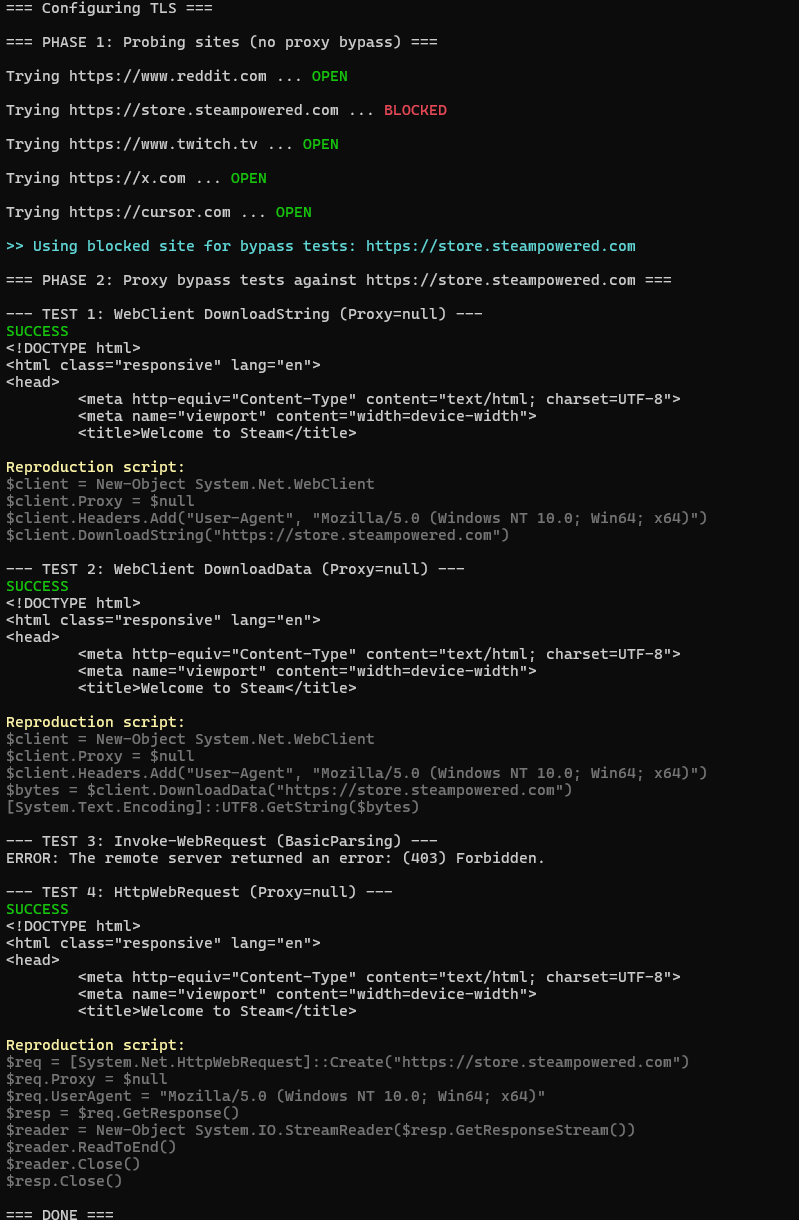
here’s what it looks like when you run it against a real enterprise proxy. tests 1, 2, and 4 bypass successfully while test 3 gets blocked:
reading the results
if tests 1, 2, or 4 succeed (the WebClient and HttpWebRequest tests), your firewall is not blocking direct outbound connections from workstations. the proxy is only enforced at the application configuration level, not at the network level.
if test 3 fails while the others succeed, that confirms the proxy itself is working for applications that respect it, but the network allows bypass through any .NET class that sets Proxy = $null.
the root cause
the root cause is simple: the firewall allows direct outbound HTTP/HTTPS (ports 80, 443) from workstation IPs. the proxy enforcement relies entirely on client-side configuration, which any script or tool can override.
to be clear, this is not a proxy vulnerability. it is an egress firewall design flaw. the proxy was never meant to be the enforcement point. enforcement belongs to the firewall, egress policy, and network segmentation.
this technique will not work in environments with proper egress controls: workstation subnets blocked from direct outbound, mandatory proxy architectures where only the proxy IP can reach the internet, or agent-based solutions like zscaler client connector, netskope, or globalprotect in explicit proxy mode. but in a surprising number of enterprise networks, none of these are in place.
remediation
the fix is straightforward but requires firewall-level changes:
- block direct outbound 80/443 from workstation subnets at the perimeter firewall
- only allow outbound 80/443 from the proxy server’s IP address
- optionally, deploy transparent proxy or network-level interception so clients cannot opt out
this way, even if a script sets Proxy = $null, the direct connection attempt will be dropped at the firewall. the only path to the internet goes through the proxy.
detection
if you’re on the blue side, you can catch this with powershell script block logging. when script block logging is enabled (event ID 4104), every powershell script that runs gets logged in full to the Microsoft-Windows-PowerShell/Operational event log. this includes the Proxy = $null line.
to enable it: group policy > administrative templates > windows components > windows powershell > turn on powershell script block logging.
once it’s on, here’s a splunk query that catches WebClient proxy bypass attempts:
index=windows sourcetype="WinEventLog:Microsoft-Windows-PowerShell/Operational" EventCode=4104
| where (match(ScriptBlockText, "(?i)WebClient") OR match(ScriptBlockText, "(?i)HttpWebRequest")) AND match(ScriptBlockText, "(?i)Proxy\s*=\s*\$null")
| table _time, Computer, ScriptBlockText
| sort - _time
this looks for script blocks where WebClient or HttpWebRequest appear together with Proxy = $null. that combination is a strong indicator because legitimate scripts rarely need to explicitly disable the system proxy.
if you want to go further, you can also monitor for direct outbound connections from workstations using sysmon event ID 3 (network connection). if powershell.exe is connecting directly to external IPs on port 443 instead of going through the proxy IP, that’s another red flag.
conclusion
proxy bypass via Proxy = $null on .NET classes like WebClient and HttpWebRequest is not a new technique, but it remains effective in a surprising number of enterprise environments. run the script, check your results, and fix the firewall rules before someone else finds the gap.